
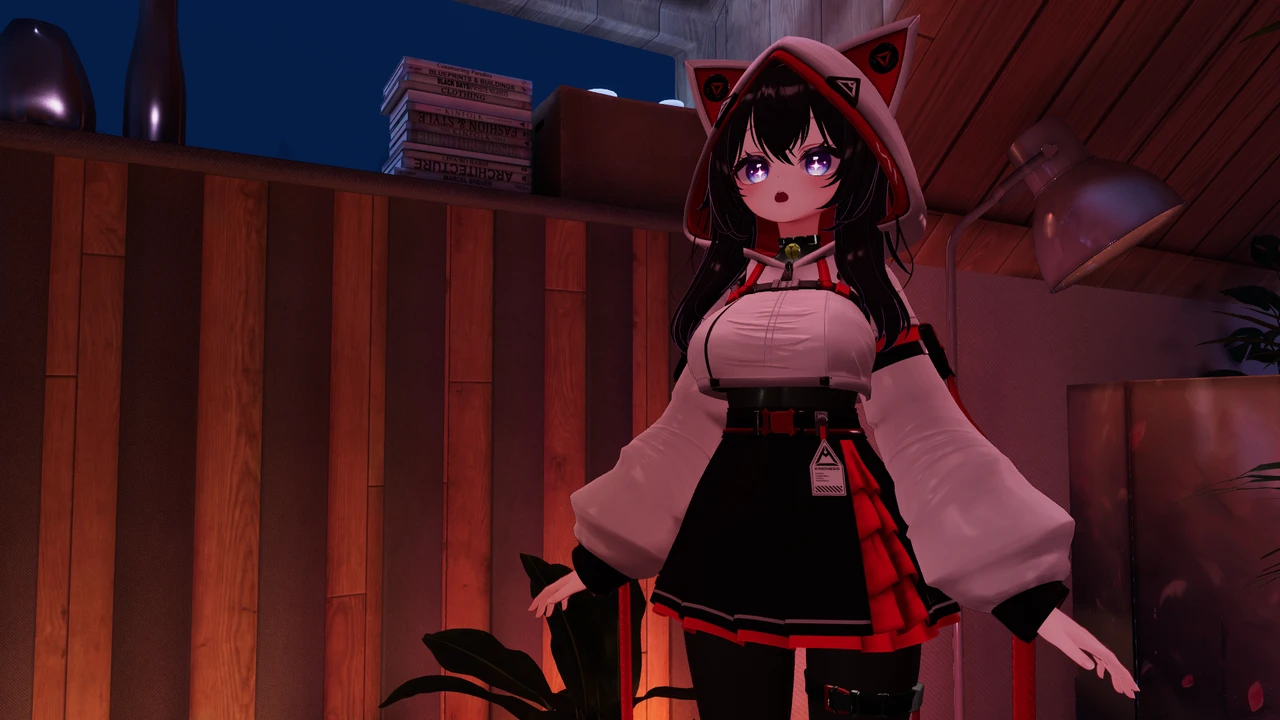
If you have ever searched for how to upload an avatar to VRChat without Unity, you have probably noticed the answers fall into two camps: people telling you it is impossible, and pages that dodge the question. The truth is more useful than either. VRChat’s official upload path does run through Unity, and there is no built-in avatar creator waiting inside the game. But in 2026 there are real ways around opening Unity yourself, and they are not equal. Some get you a borrowed avatar, some get you a preset, some cost real money per change, and some genuinely give you a custom avatar that is yours.
This guide maps all of them honestly: what each route can do, what it cannot, and what it costs. By the end you will know exactly which one fits you. If you want the short version first, it is this: for a truly custom avatar built from the creator-made bases and outfits the community actually wears, your options are learning Unity, paying someone who knows Unity, or using a desktop app that runs the pipeline for you. Everything else is a preset with your name on it.
Why VRChat avatars normally need Unity
VRChat does not accept a model file directly. An avatar file you buy or download is raw material: a 3D model plus textures plus settings that only become a working VRChat avatar after they pass through VRChat’s software development kit, which runs inside the Unity game engine. The SDK checks the avatar, builds it into VRChat’s own format, and publishes it to your account. That build step is why every tutorial you have found opens with “first, install Unity.”
There is one more gate on the account side, and it has nothing to do with software: VRChat only lets you upload avatars once your account has reached the New User trust rank. Brand-new accounts start as Visitors and get there by simply playing for a while. There is no button to press and no exact timer published, so if you are new, treat it as a reason to enjoy the game first. Everything in this guide will still be here when your rank unlocks, and you can download LAS and set your avatar up in the meantime so you are ready on both fronts.
So “without Unity” really means: someone or something else runs that build step for you. Every route below is a different answer to who that someone is.
What “custom” actually means: the four levels
Before comparing routes, it helps to name what you are actually asking for, because “custom avatar” covers four very different things:
- Wearing a preset. Someone else’s avatar, worn as-is. Free avatar worlds live here.
- Configuring a preset. Sliders and palettes inside a catalog app: pick the hair from their list, the outfit from their list, a color from their swatches. Personal-ish, but bounded by the catalog.
- Customizing a creator base. You own a base model from a creator, dress it in outfits made for it, recolor anything, add toggles, accessories and pose systems like GoGo Loco, and keep changing it forever. This is what the community calls avatar editing or, in the Japanese scene, kaihen, and it is what most people picture when they say they want “their own” avatar.
- Original modeling. Sculpting a mesh from nothing in Blender. A craft of its own, out of scope for this guide.
Most disappointment with “no Unity” solutions comes from a mismatch here: tools that deliver level 2 get marketed with level 3 language. Keep the levels in mind as you read the routes. Each one caps out at a specific level, and we will say which.
Every way to get an avatar without opening Unity
Here is the honest survey. For each route: what you get, what it cannot give you, and what it costs.
Free and instant: public avatar worlds in-game
Inside VRChat there are worlds full of avatars you can try on by clicking a pedestal. This is genuinely the fastest route, it costs nothing, and it is how most people wear their first non-default avatar.
The catch is ownership. A world avatar is borrowed, not yours. Thousands of other players wear the same one, you cannot change its colors or clothes, and your favorites list is where your relationship with it ends. On the levels above, this is level 1 and stays there. If your goal is “an avatar that is recognizably mine,” this route is the appetizer, not the meal.
Two practical tips if you start here, and you should: search worlds for “avatar” and sort by popularity to find the good pedestals, and note that favorite slots for world avatars are limited, so treat the list as a rotation rather than a collection. Plenty of people happily live at this level for months while their trust rank cooks.
Preset catalog apps
A newer category: apps and services, some run by avatar marketplaces, that let you assemble an avatar from their own catalog of parts or presets, then upload the result to your VRChat account for you. No Unity anywhere. Some even work from a phone.
These are real, and for what they do, they work. The honest limitation is the walled garden: you customize within their catalog, in the ways their configurator allows. The Booth outfit you fell in love with, the base your friends recommend, a specific hair from a specific creator: out of scope. Outfit swaps and deeper edits after the fact usually are too. This is level 2 by design, and the marketing will not always tell you that.
If you go this route, evaluate a catalog app the way you would a phone plan: check what the free tier actually includes before investing hours in a design, check whether the avatar uploads to your VRChat account or stays inside their platform, and check whether you can come back and edit later without starting over. If their catalog has what you want, this is a legitimately easy route. If you have started browsing what creators sell on Booth, you have already outgrown it.
AI avatar generators
Type a description or upload a picture, get a 3D model. As of 2026, these tools are genuinely impressive at generating a model and genuinely misleading about the last mile. Read the FAQ of almost any of them and you will find the quiet admission: to actually get the result into VRChat, you import it into Unity and go through the SDK like everyone else.
There are also quality realities the marketing skips: generated models need rigging cleanup, their proportions and performance stats are a lottery, and they exist outside the ecosystem of outfits made to fit known bases, so dressing them later is hard. If your dream is a one-of-a-kind original character and you accept the rough edges, they are fun. As a “skip Unity” route, they mostly relocate the Unity part to the end.
Paying someone: commissions and upload services
A whole economy exists because of the Unity wall, which tells you how real the wall is. It comes in two flavors:
- Avatar commissions. An artist customizes or builds an avatar to your spec and hands it over or uploads it for you. In the English-speaking scene this typically runs from around $50 to $600 and up depending on scope. In the Japanese scene, kaihen (avatar modification) services commonly charge a few thousand to tens of thousands of yen per job.
- Upload services. For a small fee, someone runs the SDK build for an avatar you already own and uploads it to your account.
Both are legitimate and support skilled people, and on the levels above this route reaches level 3: the artist is doing real kaihen on a real base you own. Two honest cautions. First, the cost is recurring: every future outfit change, recolor, or fix is another job, so the meter never really stops, and “I will just wear it as delivered forever” is a promise very few people keep. Second, some upload services work by logging into your VRChat account, and handing your credentials to a stranger is a real risk you should weigh, not a formality. Services that use VRChat’s own systems without your password exist, so prefer them if you go this way.
If you commission, a little diligence goes a long way: look at the artist’s past work on the same base family as yours, agree up front on what happens with the project files (you want them, so the next artist or you can continue), and confirm the avatar’s license permits a third party doing the work, because some creator terms have things to say about it.
A desktop app that runs the pipeline for you
The newest answer, and the reason this blog exists: keep the real ecosystem, remove the engine. Layman’s Avatar Studio is a Windows app built on a simple idea: the avatars people actually want are the creator-made bases and outfits from stores like Booth, and the only thing standing between you and wearing them is technical setup that software can do.
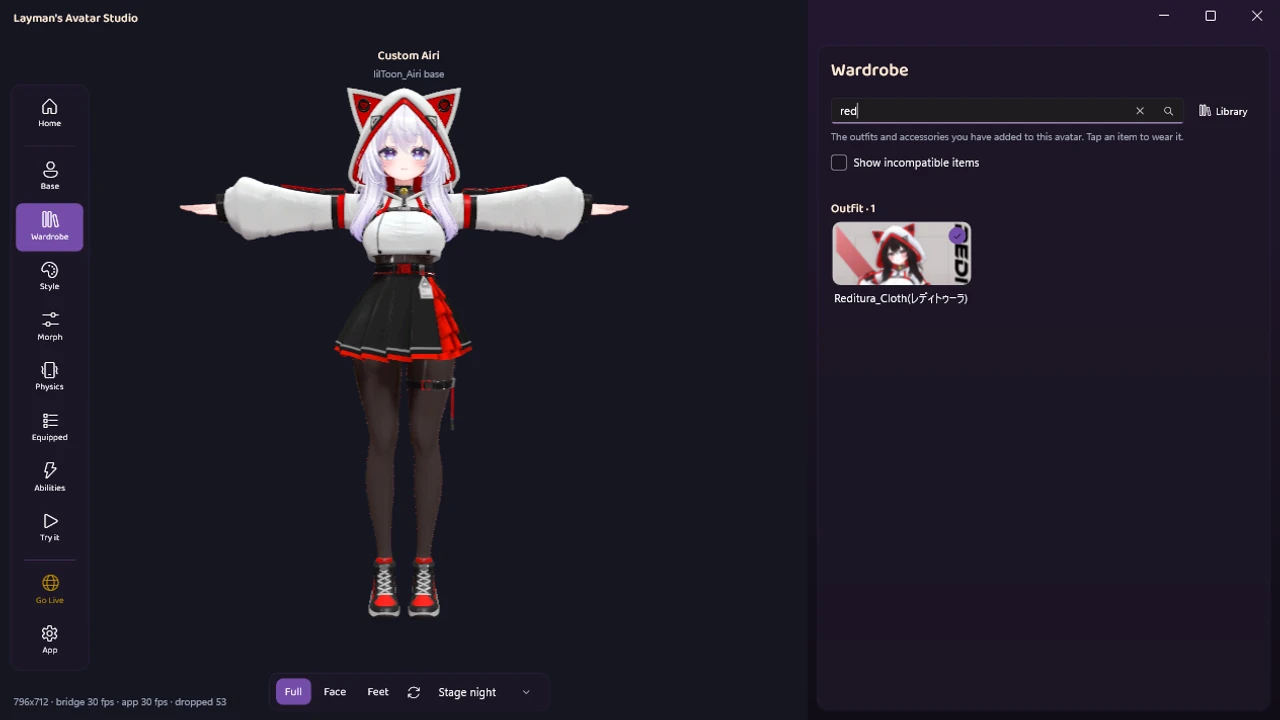
So LAS does it. You import the files you bought, and they are unpacked, identified, and sorted into a wardrobe automatically. You dress your avatar by clicking outfits, not by parenting armatures.
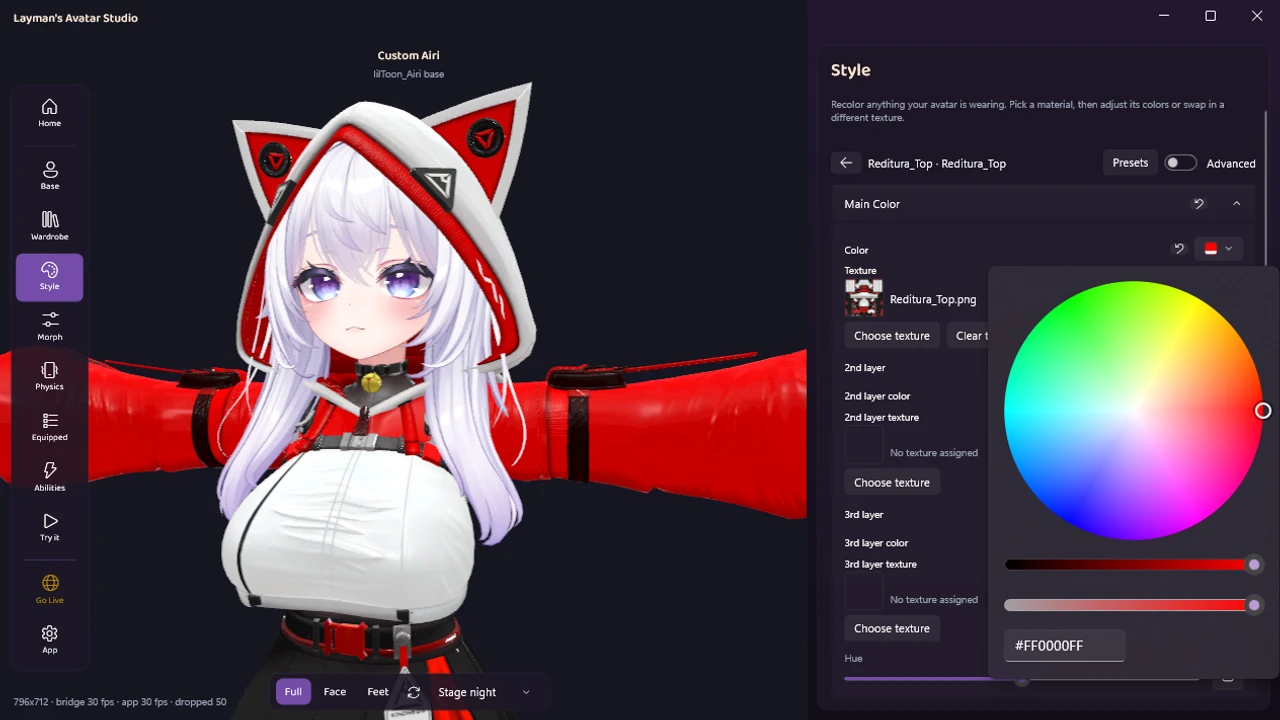
Recoloring works the same way: pick a part, use a color wheel, and watch the change on the live viewport instead of in your imagination.
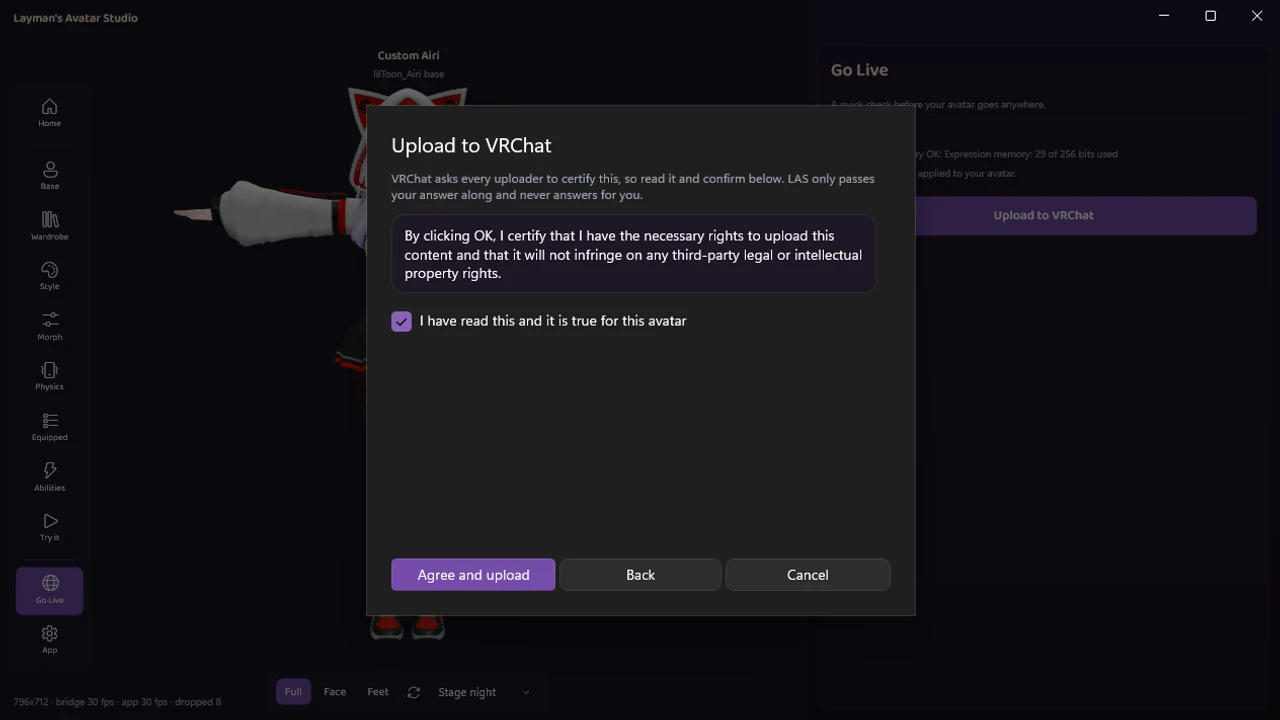
Under the hood, LAS wires up the same respected tools experts use in Unity, like Modular Avatar and VRCFury, and it works non-destructively, meaning your original purchased files are never modified. When you are done, the upload goes through the official VRChat SDK, with you certifying your rights to the content exactly as VRChat requires. Your account, your avatar, no credentials handed to a human stranger.
Honesty section, because this is our own product: LAS is available right now, and you can download it free today. It is Windows-only. It is an avatar customizer, not a 3D modeling tool: it will not sculpt you an original mesh from nothing, and outfits still need to be made for the base you own. The free plan covers full customization and upload for up to 5 avatars at a time, with paid plans adding room beyond that. You can see the whole flow in the tour on our homepage.
The routes side by side
| Route | Truly custom? | Uses your Booth purchases? | Change it later? | Typical cost |
|---|---|---|---|---|
| Avatar worlds | No, shared presets | No | No | Free |
| Preset catalog apps | Within their catalog | No | Within their catalog | Free to modest |
| AI generators | Unique, rough edges | No | Hard | Free tiers to subscriptions, plus Unity at the end |
| Commissions / upload services | Yes | Yes | Each change is a new job | ~$50 to $600+ per commission, fees per upload |
| Desktop pipeline app (LAS) | Yes | Yes | Yes, that is the point | Free plan, paid plans for more |
Which route fits you?
A quick decision guide, using everything above:
- You are brand new and want to look decent tonight: avatar worlds. Zero cost, zero setup, and your trust rank needs the playtime anyway.
- You want something personal-ish fast and the catalog look is fine: a preset catalog app. Go in knowing it is level 2.
- You dream of a one-of-a-kind original character and enjoy tinkering: an AI generator can be a fun starting point, as long as you accept that the finish line still involves Unity, yours or someone else’s.
- You have more money than free time and want one great avatar done for you: a commission. Budget for the follow-up jobs too.
- You own (or covet) Booth bases and outfits and want to keep customizing forever: that is level 3 as a lifestyle, and your realistic options are learning the manual pipeline below or letting LAS run it for you.
- You play on Quest only: read the platform section below first, whatever else you pick.
The manual path, so you know what you are skipping
It would be dishonest to write this guide without describing the road everyone else walks, so here it is, compressed but real:
- Install the toolchain. Unity, in the specific version VRChat requires rather than the newest one, plus VRChat’s Creator Companion (VCC) to create and manage avatar projects.
- Create a project and import your avatar. The package you bought goes in, usually alongside a required shader (lilToon and Poiyomi are the common ones). Skip the shader and your avatar renders in famous error-pink.
- Add the tooling your outfit expects. Most modern Booth outfits assume Modular Avatar, some setups use VRCFury. These do the actual work of binding an outfit’s skeleton to the body’s.
- Dress the avatar. Outfit prefab onto the avatar in the hierarchy, run the setup, hide the original clothes, then fix what clips through and adjust body blendshapes the outfit expects.
- Check it. Test gestures, toggles, and physics in the editor or a test world, because finding problems after upload means doing the upload again.
- Build and publish through the SDK. Log in, pass the validation checks, set a thumbnail, upload, and read the console when something goes red (the common VRChat upload errors, decoded).
Thousands of people do this every day, many of them entirely self-taught, and the community guides are genuinely good. But the beginner failure stories are remarkably consistent, and worth knowing whichever route you pick: the build bar that freezes with no error message, materials showing up pink because a shader is missing, uploads failing over a thumbnail, versions that do not match the tutorial. None of these mean the person is bad at this. They mean it is a professional content pipeline being operated by someone who wanted a cat-ear hoodie. If reading that paragraph made you tired, that tiredness is the honest answer to whether you should take the manual path for one avatar. If it made you curious, the editor-style walkthrough of what each step really does is a good next read.
What about Quest and mobile players?
Short version: the avatar you upload from a PC pipeline is a PC avatar. For Quest and phone players to see it as more than a gray fallback robot, a separate lighter version has to be built and uploaded for their platform, with tighter limits on polygons, materials, and effects. That extra build is also Unity work on the manual path, and it is where several of the routes above quietly stop: check whether any service you pay covers a Quest version before assuming it does. LAS builds PC avatars today. If Quest support matters to you, tell us in the Discord, because we prioritize loudly requested things.
Frequently asked questions
Is it hard to make a VRChat avatar? The honest answer is: the manual pipeline is genuinely hard the first time, not because any single step is rocket science but because it stacks a dozen unfamiliar tools and failure points. That difficulty is exactly why every route in this guide exists. With the right route for your goal, it does not have to be hard at all.
How long does a custom avatar take? Depends entirely on the route. A world avatar: seconds. A catalog preset: under an hour. A commission: days to weeks of turnaround, mostly waiting. The manual pipeline: plan a first afternoon that may become a first weekend, then much less once you know it. LAS: importing a purchase and dressing your avatar is minutes. You will spend longer than that playing with colors, but that part is the fun.
How much does a custom avatar actually cost? The parts and the labor are separate. Creator-made bases typically cost a few thousand yen (roughly $20 to $50), outfits less, and buying them is its own small adventure. Then either your time (manual), an artist’s time (commissions, $50 to $600+), or a tool’s subscription. What you should not have to pay for twice is the same technical setup on every single change.
Does VRChat have a built-in avatar creator? No. VRChat gives you default avatars and lets you wear what worlds or your own uploads provide, but there is no in-game creator. That is why this whole ecosystem of tools, marketplaces, and services exists.
Can I get avatars from avatar worlds and keep them? You can favorite a limited number of world avatars and wear them any time, but you cannot edit them, and you lose nothing if you think of them as rentals: that is what they are.
Can a friend upload an avatar to my account for me? Technically yes, if you share your login, and plenty of people have done it. It is still credential sharing, with everything that implies. A tool that uploads through the official SDK while you stay in control of your own account gets you the same result without the trust exercise.
Can I make a VRChat avatar from a selfie? Tools exist that generate a lookalike model from photos, but the output is generally far from the anime-style quality bar of the creator scene, and it still needs the Unity pipeline to get in-game. For most people the better path to “an avatar that feels like me” is picking a base you love and customizing it until it is yours.
Do I need a powerful PC? You need a PC that runs VRChat reasonably, and for LAS specifically a Windows machine. You do not need a 3D-workstation graphics card just to customize and upload an avatar.
Is any of this against VRChat’s rules? Buying avatars, customizing them, and uploading them to your own account with the creator’s permission is exactly how the ecosystem is supposed to work. What gets people in trouble is ripping other people’s avatars or uploading content they have no rights to. Every route in this guide assumes you own what you upload, and the upload step has you certify that to VRChat either way.
Get there without the grind
You now know every real route, which is more than most answers to this question will give you. If a borrowed avatar or a preset covers your needs, take the free wins with our blessing. If what you actually want is the real thing, custom, yours, built from the creator ecosystem, without adopting a game engine as a hobby, that is the exact gap Layman’s Avatar Studio exists to close.
LAS is available now. Download it for free, check the pricing if you are curious what Free covers, and drop into our Discord if you have questions this guide did not answer. The FAQ on our homepage covers the short ones.