
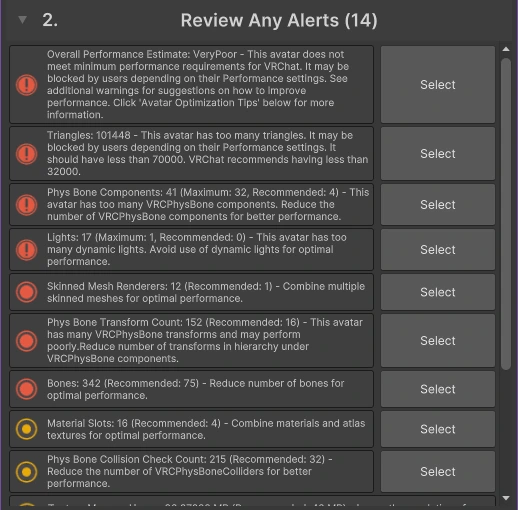
This avatar, a dressed-up Booth base called Velle Cosplay, was rated Very Poor. VRChat’s own numbers said why: 101,448 triangles against a limit of 70,000, 41 physics components against 32, and 17 lights against 1.
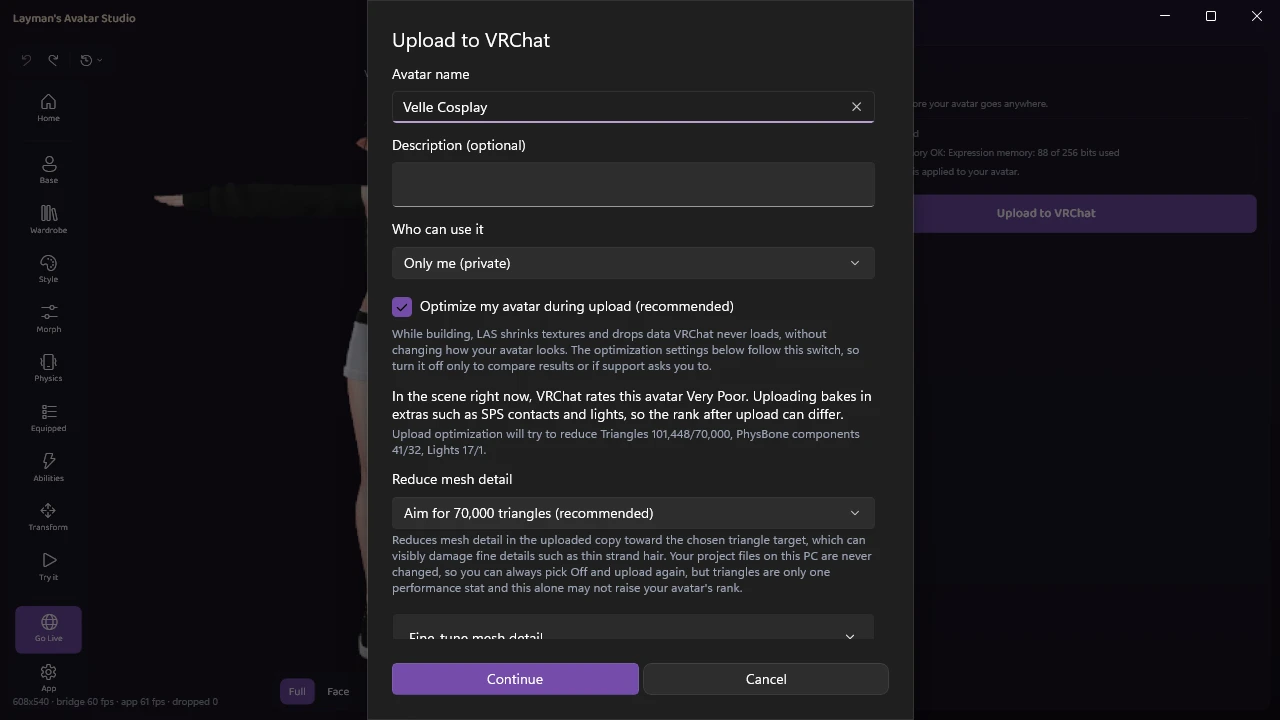
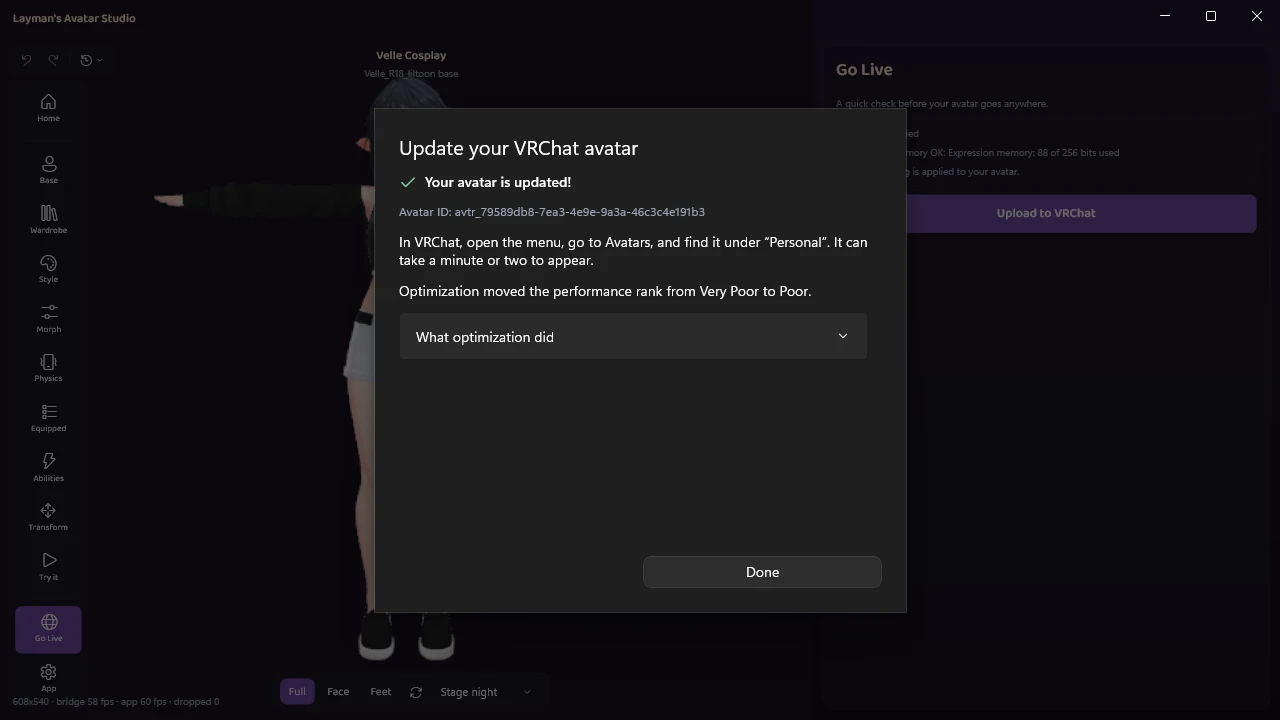
One upload later, the same avatar came back Poor:
This post is a Very Poor performance fix guide for a VRChat avatar you own. First, what the rank actually measures and which stat is holding yours, then the manual fixes stat by stat, and then the version where a tool does it without Unity and tells you exactly what it changed. The manual route is written in full, so this answers the question even if you never install anything of ours.
What Very Poor actually costs you
VRChat gives every avatar a performance rank (Excellent, Good, Medium, Poor or Very Poor) and shows it to everyone around you. The rank exists so players can decide how much of other people’s avatars their own computer or headset has to carry. If the words around avatars are new to you, the short version is that the rank is a label, not a punishment.
What the label does depends on who is looking:
- On PC, with default settings, nothing is hidden. VRChat’s default minimum displayed rank on PC is Very Poor, which means every rank shows.
- Many PC players raise that setting. Anyone who sets their minimum to Poor sees a Very Poor avatar replaced by a fallback (a stand-in model), or with its physics, lights and effects stripped. Crowded events, performance-minded friend groups and some community rules ask for Poor or better for exactly this reason.
- On mobile and standalone headsets, the default minimum is Medium, so Poor and Very Poor avatars are hidden there unless someone overrides them one by one. That is its own topic, covered in the limits section below.
So, the honest answer to “was my work pointless if everyone at the event wore a heavy avatar anyway?”: Poor is the line that matters for most rooms. Poor still shows for anyone who has raised their setting to Poor, while Very Poor is the rank that gets you hidden by the people who care most about frame rate. Nobody should feel ashamed of a heavy avatar. Heavy avatars are heavy because a creator made them beautiful, and getting one under the line is a courtesy, not a confession.
The rule nobody tells you: your worst stat is your rank
VRChat measures around twenty separate stats, and your avatar is rated at its single worst one. There is no averaging. One stat over the Poor limit makes the whole avatar Very Poor, even if every other stat would qualify for Good.
That one rule explains most of the confusion people bring to this question:
- A 2.5 MB avatar can be Very Poor while a 2.7 MB avatar is Medium. File size is not a performance stat for the rank at all. The small avatar simply has one stat over a line somewhere, perhaps too many lights, while the bigger one is evenly moderate.
- Fixing your second-worst stat changes nothing on its own. If triangles and physics are both over, cutting physics in half leaves you exactly as Very Poor as before, until triangles come down too.
- A clean-looking avatar can be Very Poor for a reason you cannot see, which is the Read/Write trap covered below.
Download size does have its own limits, and they matter mostly for mobile, which is why it shows up in the common questions about LAS as a separate topic from the rank.
Every performance stat, one line each
Here is what VRChat counts, what usually makes each one big on a dressed-up Booth avatar, and whether you can realistically change it. The exact limit numbers live in VRChat’s performance ranking reference, and they do change over time, so we link it rather than copy a table that will go stale. For reference, the PC Poor limits at the time of writing include 70,000 triangles, 150 MB of texture memory, 16 skinned meshes, 32 material slots, 32 PhysBone components and 1 light.
| Stat | What it is | What makes it big | Can you change it? |
|---|---|---|---|
| Triangles (polygons) | The tiny flat pieces every 3D model is built from | Detailed hair, layered outfits, a second outfit hidden underneath | Yes, with a simplifier, at some cost to fine detail |
| Texture memory | How much graphics memory the avatar’s images take | Large textures on small parts, uncompressed textures, alternate looks | Yes, usually the cheapest win |
| Skinned meshes | Parts that bend with the skeleton | Every outfit piece added as its own part | Yes, by merging parts |
| Basic meshes | Rigid parts that do not bend | Accessories, props | Yes, by merging or removing |
| Material slots | Separate surface recipes the game draws one by one | Every piece with its own look, spare outfits | Yes, by merging or removing pieces |
| Bones | The skeleton’s joints | Outfits that bring their own skeleton | Partly, mostly by merging outfit bones into the body |
| PhysBone components | Separate physics setups (hair, tails, skirts, ears) | Every accessory that wiggles | Yes, by merging or trimming chains |
| PhysBone transforms | Individual bones moved by physics | Long chains with many links | Yes, by shortening chains |
| PhysBone collision checks | Physics bones times the colliders they touch | Colliders linked to many chains | Yes, and it is often the one that bites |
| Contacts | Touch sensors and senders (headpats, interactions, toys) | Add-on systems that bring dozens of them | Yes, by removing the ones you do not use |
| Audio sources | Sounds the avatar can play | Sound effects packs with many variations | Yes, by dropping extras |
| Lights | Real light sources on the avatar | Glow effects, and invisible signal lights some add-ons use | Yes, often safely |
| Particle systems | Sparkles, smoke, hearts | Effect add-ons | Yes, by removing |
| Constraints | Parts pinned to other parts | Props held in hands, world-fixed items | Partly |
| Animators | Separate animation brains on the avatar | Older add-ons that bring their own | Partly |
Most of the stats that jump when you add an outfit to your avatar are the same four: material slots, skinned meshes, physics and triangles. An outfit is rarely “too heavy” on its own. It is the second and third outfit stacked on the first that push a line.
The one that is not a number: Read/Write disabled
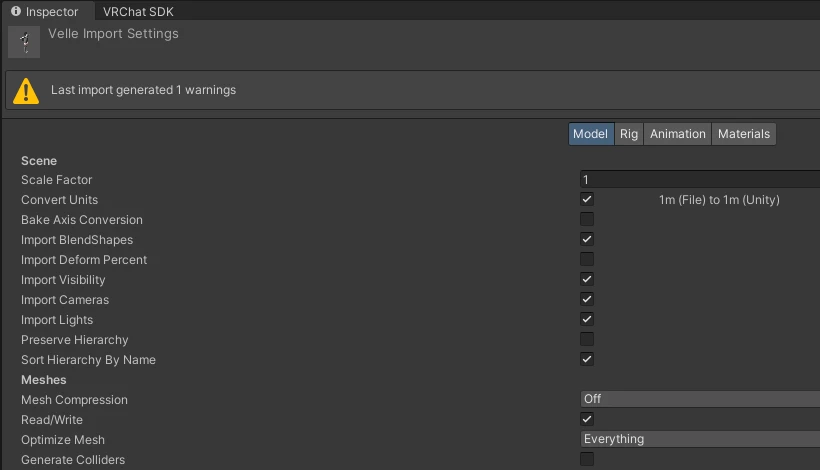
There is one setting that forces Very Poor no matter what the numbers say. If any mesh on your avatar has Read/Write turned off in its import settings, VRChat immediately rates the avatar Very Poor, so a 12,000-triangle avatar can be ranked the same as a 300,000-triangle one.
It usually comes from a model imported with the setting off, since Unity does not turn it on by default, or from a tool that switched it off to save memory. The tell is exactly this: every stat in the list looks fine, and the rank still does not move. The manual fix is one sentence long: select the model file in Unity, tick Read/Write in its import settings, apply, and upload again.
If you are chasing this because an upload also threw errors, the most common VRChat avatar upload errors are decoded in their own post. In LAS, Read/Write is turned on automatically before every build, so you do not have to go looking for it.
Find out which stat is holding your rank
Measuring comes before fixing, and this is where most people get stuck. There are three honest ways to see your numbers:
- VRChat itself. Once an avatar is uploaded, its detailed performance stats are viewable in-game, stat by stat, with the ones over each rank’s line marked.
- The VRChat SDK in Unity. The build panel lists the same stats before you upload, which is the standard way creators check.
- A tool that reads the rank before the build. LAS’s upload step shows the rank the avatar has right now and the exact stats holding it there, as in the first picture on this page. How that works is covered in the upload docs.
This is what VRChat’s own breakdown showed for Velle Cosplay before the trim, with the triangle count in red:
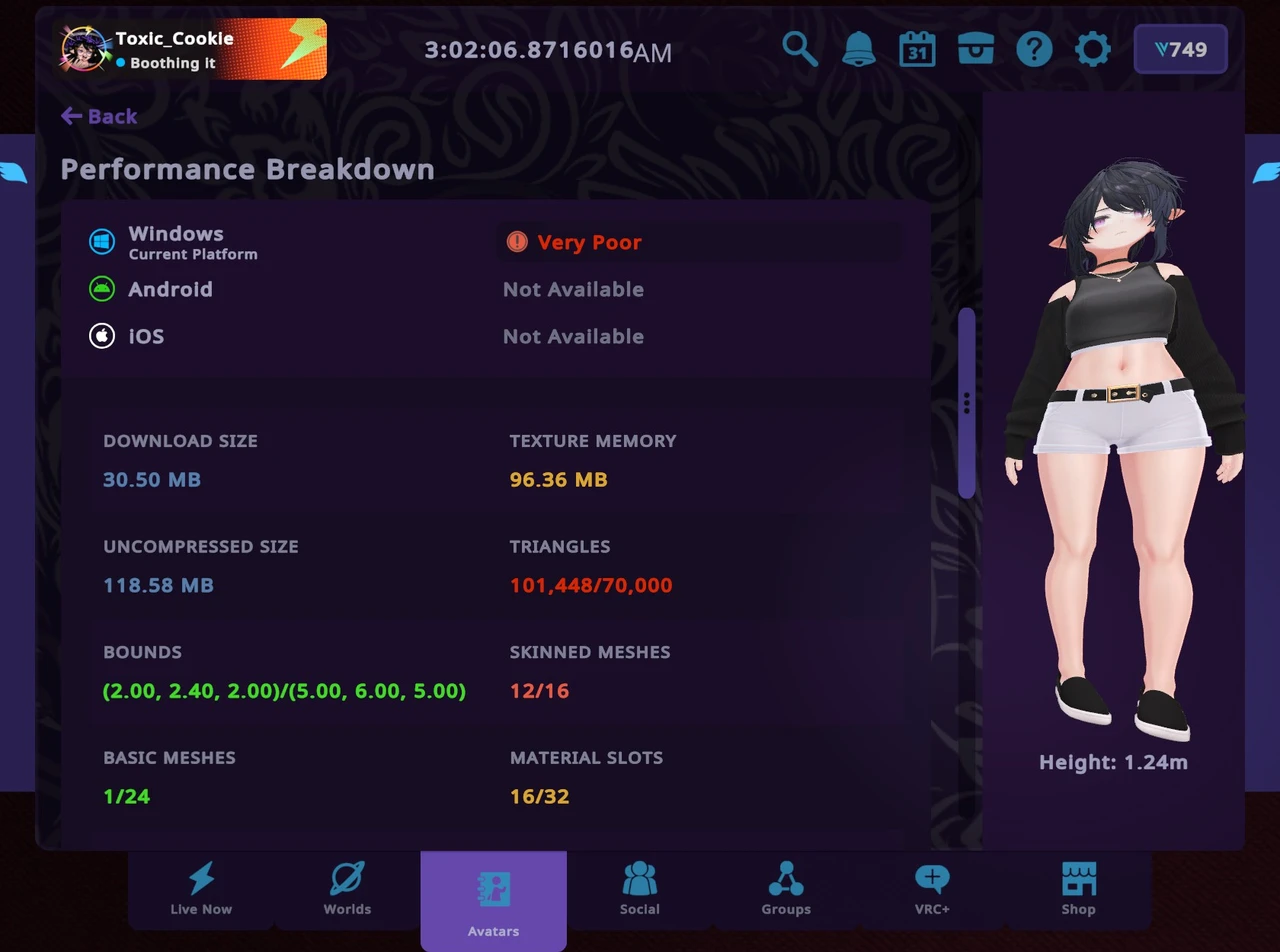
Whichever way you use, write the over-the-limit stats down before you touch anything. Work on the worst one first, then re-measure. If every stat looks fine and the avatar is still Very Poor, go back to the Read/Write section above.
The manual fixes, stat by stat
This is the Unity route, the way most guides teach it. It works. Each fix below ends with what it really costs, so you can decide which ones are worth it for your avatar. If you have never opened Unity on purpose, this is also the part of the job a VRChat avatar editor that works without Unity replaces.
Here is the SDK’s list for Velle Cosplay before any of this. The entries with an exclamation mark are the ones past the Poor line, and the plain red and yellow dots are only over the lines for better ranks:
Textures and VRAM
Texture memory is usually the biggest and cheapest win. A 4K texture on a pair of shoes costs as much graphics memory as a 4K texture on the whole body, and many avatars ship with 4K textures on parts you will never see up close. Halving a texture’s resolution cuts its memory to a quarter, and turning on compression cuts it again. In-game, the difference on a shoe or a hair clip is close to invisible.
In Unity this means opening each texture’s import settings, lowering the maximum size and choosing a compressed format, one texture at a time, or using a texture tool package that does it in bulk. The cost: a little sharpness on close-ups, and the time it takes to go through every texture.
If your avatar’s rank dropped after a VRChat update without you changing anything, this is probably why. Since an update on 14 August 2025, VRChat’s stats also count textures used by material swaps (the alternate looks an avatar can switch to), which used to be missed. VRChat’s own explanation was that the measurement became more accurate, not that the standard became stricter. An avatar with lots of alternate looks was always that heavy and is now measured honestly, so the fix is the same: smaller and compressed textures.
Materials and meshes
A material slot is one surface recipe the game has to draw separately, and every outfit piece usually brings its own. Merging meshes (joining several parts into one) and merging materials (combining their textures into one shared image, called atlasing) both reduce the count.
The free, non-destructive optimizer packages the community uses do much of the mesh merging automatically at upload time. Atlasing is more involved and can change how some materials look. The costs: merged meshes mean a hidden piece still carries a small constant cost instead of disappearing entirely, and merging is the step most likely to need a check that your clothing toggles still work afterwards.
Physics (PhysBones)
Physics hides three separate stats: components (how many separate physics setups), transforms (how many bones they move) and collision checks (how many of those bones test against how many colliders). The collision-check number is the one that bites, because it multiplies: a hand collider linked to ten hair chains counts against every bone in all ten.
The plain-words fixes, in the order that costs least: merge chains that do the same job (ten front hair strands can share one setup), drop collider links you would never notice (does your back hair really need to collide with your hands?), shorten chains at the tips, and last, remove whole chains. What you give up: merged chains share one grab point, and shortened tips stop moving.
Polygons
This is the honest hard one. Reducing triangles means running a mesh simplifier, which removes detail by merging nearby points, and that is always a quality trade. Thin strand hair and fine lace are what break first, because there is not much geometry to lose before the shape goes.
The highest-quality answer is hand retopology in Blender (rebuilding a mesh with fewer, better-placed triangles), and that is a modelling job, not a settings job. Before you spend a weekend on it, check your list from the measuring step: for most dressed Booth avatars, polygons are not the only stat holding the rank, and fixing them alone will not move it.
The things you are not wearing
This is the section most guides skip, and it is often the biggest surprise. VRChat counts everything that is part of the avatar you upload, not just what is showing. Outfit pieces toggled off, the alternate hairstyle, the shoes hidden under your boots, spare accessories, and the sounds and contacts that came with an add-on all count exactly like the things you can see.
A well-stocked wardrobe can hold an avatar at Very Poor on material slots or contacts alone while everything visible is perfectly fine. Disabling an object in Unity does not remove its cost either. The manual fix is deleting the pieces you never wear from what gets uploaded, which is easiest when your outfits live as separate items you can add back later. If you shop for avatars and outfits on Booth, your purchases stay in your downloads, so leaving a piece out of an upload never loses it.
Escaping Very Poor in LAS, start to finish
Everything above is what Layman’s Avatar Studio does at upload, on the copy of the avatar that gets sent to VRChat, and your purchases are never modified. The optimization switches are on by default, the pass aims at VRChat’s Poor limits, and everything it changed is reported afterwards. Here is the Velle Cosplay run from the pictures above, step by step. The feature tour shows the rest of the app.
Your rank, before the build starts
Go Live’s upload step shows the rank the avatar has in the scene right now and which of the stats holding it there the optimization will try to reduce. For Velle Cosplay that was triangles, physics components and lights. Stats that only changing the avatar itself can move are named separately, so you know before you wait for a build whether this upload can move your rank at all.
Physics trim that counts the way VRChat counts
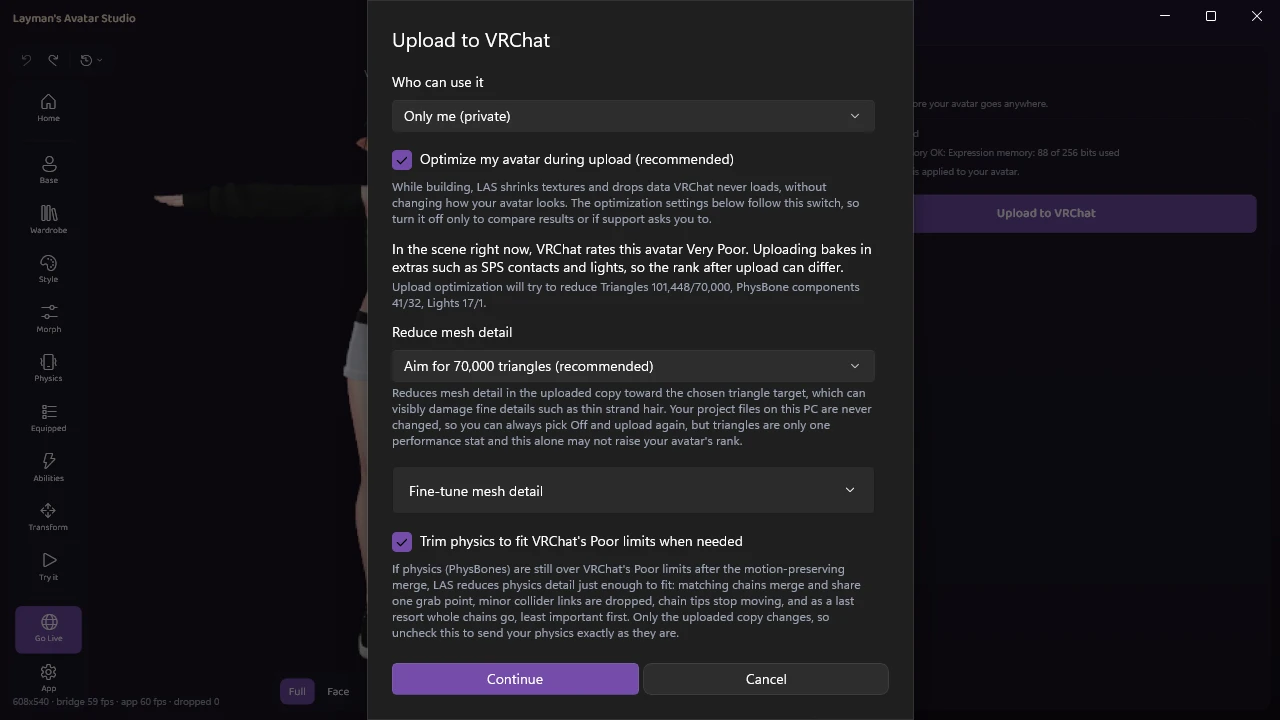
The physics trim follows the same order as the manual route: matching chains merge and share one grab point, minor collider links are dropped, chain tips stop moving, and as a last resort whole chains go, least important first. It asks the VRChat SDK for the real numbers after every cut and keeps going until they are under the limit, so the report never claims success while the avatar is still over.
Sliders decide what is given up first. Every chain gets its own, labelled with its name and what it is:
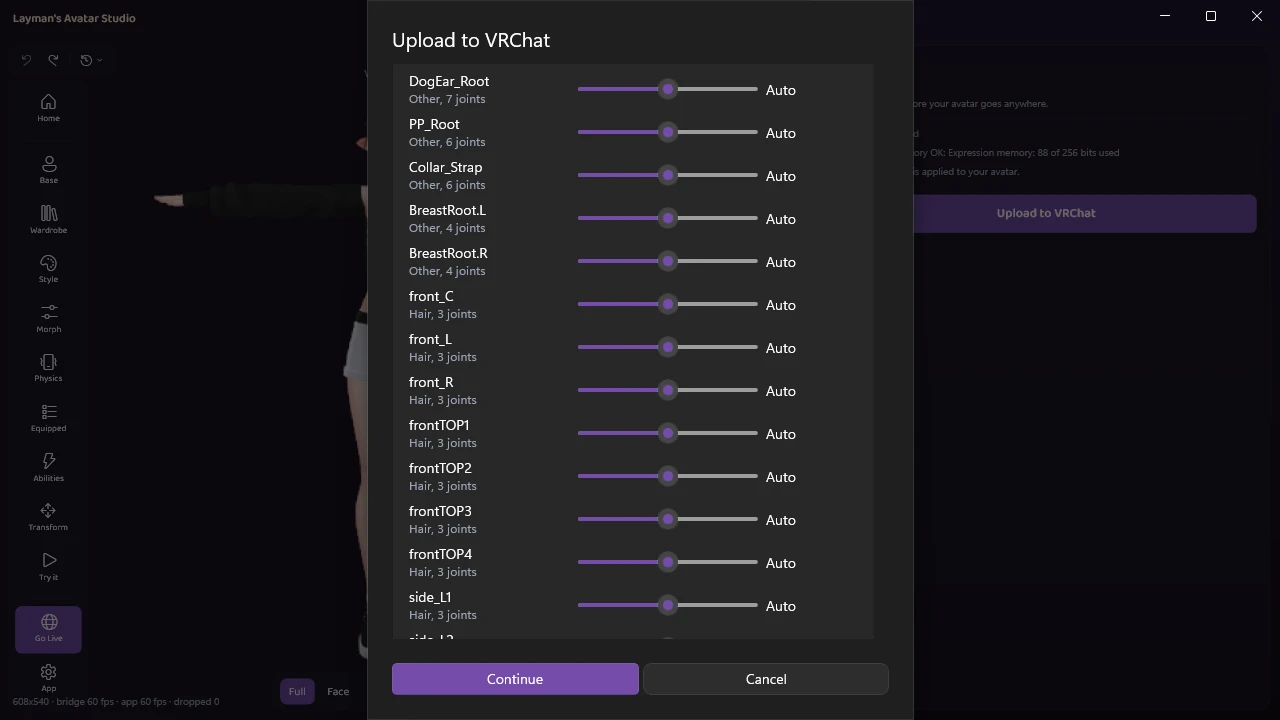
A pre-checked option lets the trim take physics from pieces that are toggled off, such as alternate hair or a spare tail, before anything you can see. Uncheck it and your toggled-off pieces keep all their physics, while the trim works on what you can see instead. On Velle Cosplay the trim took physics components from 41 to 22, with 8 chains merged.
Meshes, mesh detail and textures
Meshes are combined only as much as needed to fit the limit, and the clothing toggles that point at merged pieces are rewritten so they keep working. On this avatar the mesh count was already under the Poor limit, so the report simply says merging was not needed.
Mesh detail is the one dropdown on the page: “Aim for 70,000 triangles” is the recommended choice, and a fine-tune section below it has a slider per part. The wording under it is honest in the same breath: reducing mesh detail can visibly damage fine details such as thin strand hair, and triangles are only one performance stat. On this run one ponytail piece was kept at full detail, and the report names it rather than hiding it. The rest came down from 101,448 triangles to 68,015. Textures are compressed and capped, which took this avatar’s texture memory from 96.4 MB to 20.9 MB. When the geometry that cannot be reduced already sits over the target, LAS says so before the build instead of reporting a success afterwards.
Everything you are not wearing, handled for you
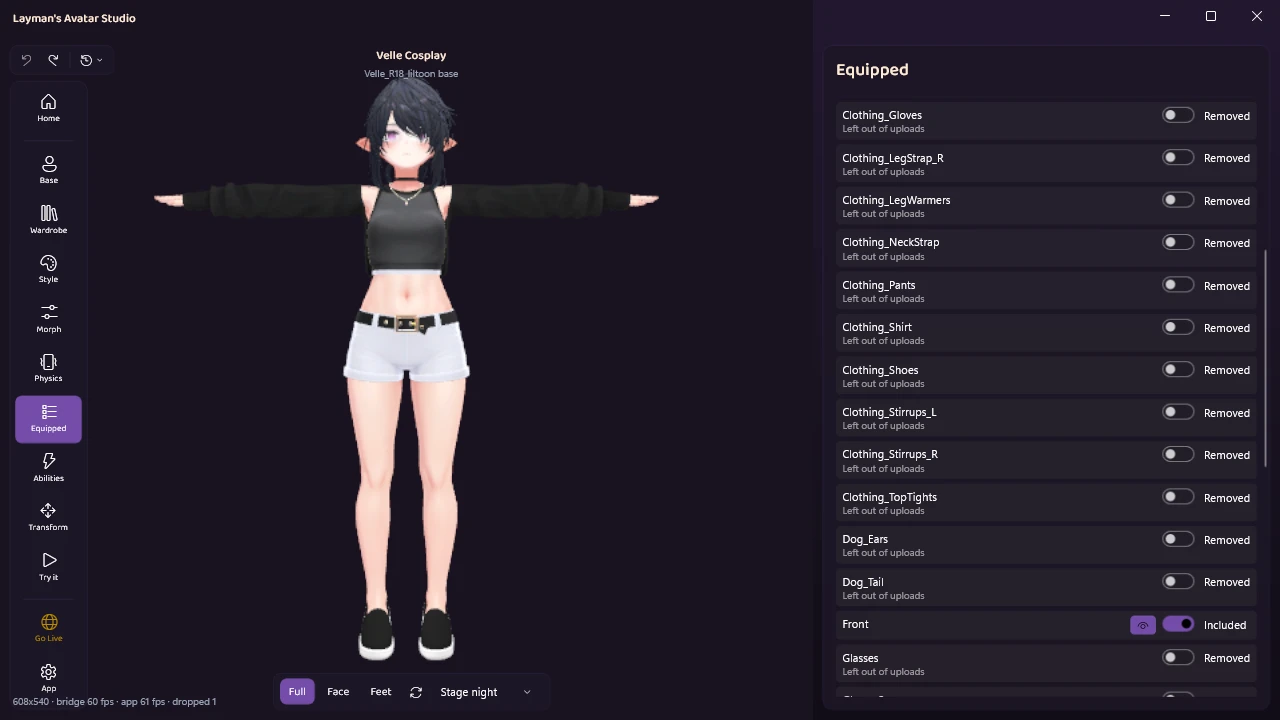
You can leave any piece out of uploads yourself from the Equipped panel, as above, and bring it back later with the same switch. The upload pass also handles the costs you cannot see, automatically:
- While the material count is over the limit, pieces nothing could ever show go first, then the smallest pieces a toggle switches on, stopping as soon as the avatar fits. A piece you can see at rest is never touched.
- Geometry hidden under clothes is removed using what LAS already knows from your wardrobe. A creator’s shrink shape that is permanently set to full, with no toggle that could ever uncover it, becomes real mesh removal too.
- When sounds hold the rank, extra random takes of the same sound are dropped while every sound still plays.
- When contacts hold the rank, toy depth animations go first and then the lowest-ranked sockets, with sockets you placed yourself given priority to stay by default.
- The invisible signal lights some add-ons put on every socket, which VRChat counts as real lights, are removed. On Velle Cosplay that was 16 of the 17 lights.
Leaving out off-at-rest pieces, trimming sounds, the socket budget and removing the signal lights each have their own switch. Hidden-geometry removal follows the main optimization switch. The report names the pieces and sockets that were left out, and counts the lights and sound takes.
The report you get afterwards
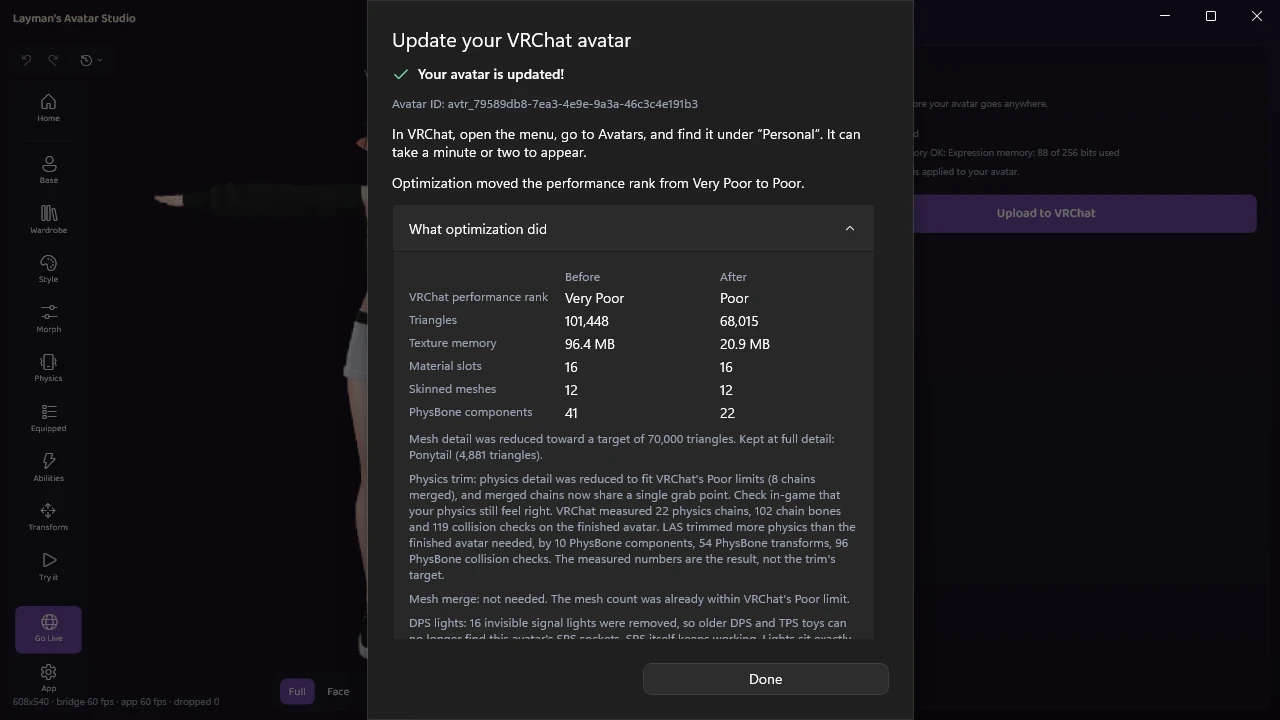
The done panel says the rank before and after in one sentence, then shows the numbers side by side, with a line per optimizer saying what it actually did. The physics line reports the numbers VRChat measured on the finished avatar, not what the trim aimed for. A stat sitting exactly on the Poor limit, like this avatar’s one remaining light, is described as at the limit and still rated Poor, which is the kind of detail that saves an hour of confusion. The edits you make before an upload are a different story: every one is in the avatar’s history, so you can undo any change to your avatar if a later edit goes wrong.
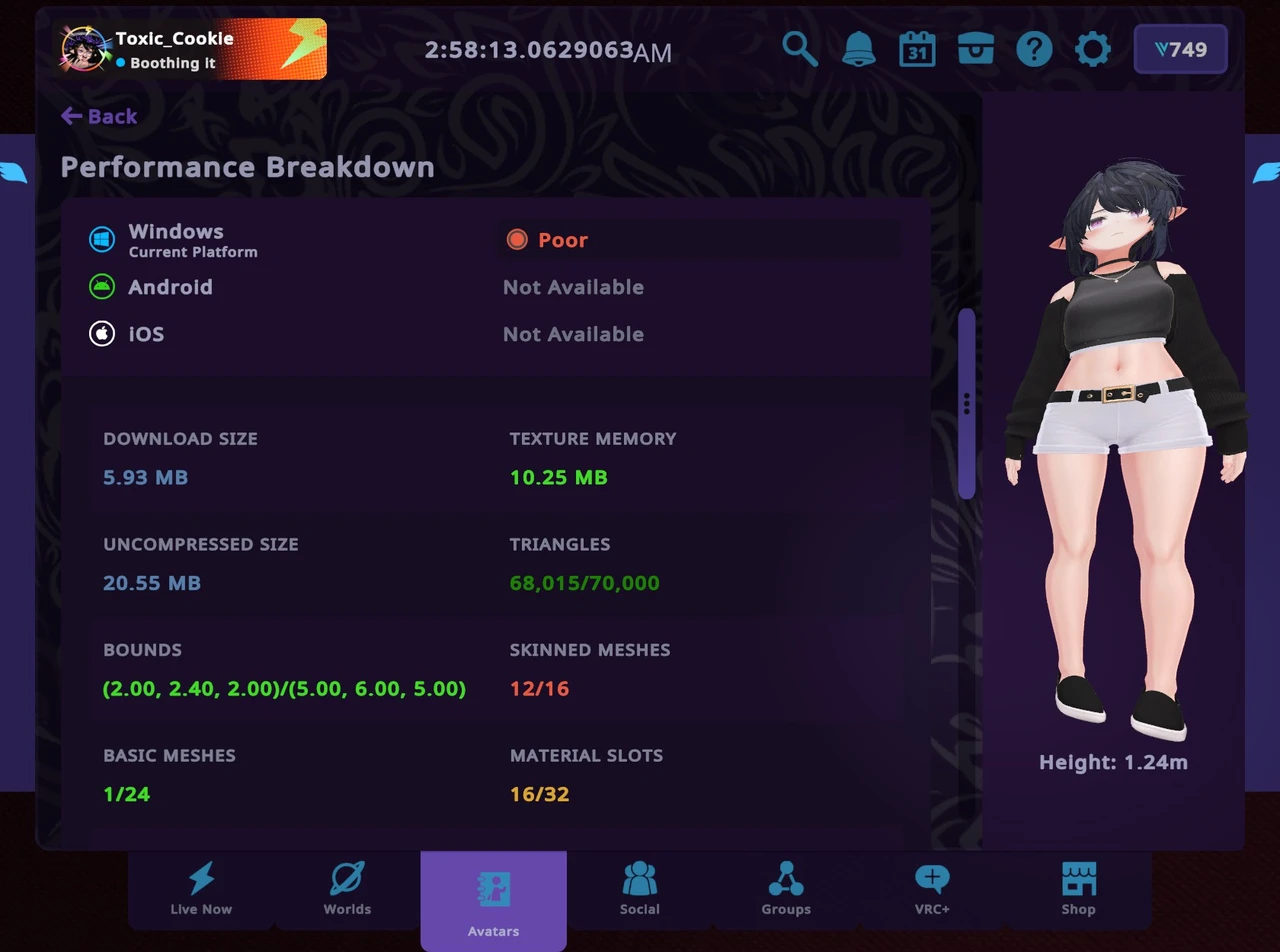
The in-game check agrees. VRChat’s own breakdown of the uploaded avatar reads Poor, with triangles at 68,015 of 70,000 and the download down from 30.50 MB to 5.93 MB. VRChat measured texture memory even lower than LAS’s own estimate, at 10.25 MB:
What LAS will not do
The honest print, before anything else:
- It is not a modelling tool. It reduces mesh detail toward a triangle target on the uploaded copy, but it will not retopologise a mesh, weight paint, join meshes by hand or author shapekeys. When the quality cost matters, that work belongs in Blender.
- It aims at Poor, not Good or Excellent. If an event asks for Good, the avatar itself needs to change, usually by wearing less at once.
- Some stats come from what the avatar is made of. When only changing the avatar can move a stat, the report names it instead of hiding it.
- It does not build Quest or mobile versions today. Mobile and standalone players see a PC-only avatar as a fallback, and their 10 MB download limit and stricter ranks are a separate job. For a friend on a phone or a headset, the honest answer is a lighter avatar made for that platform.
What LAS is and is not built for is laid out on what makes LAS different.
Does any of this change my avatar?
The optimization only changes the uploaded copy. Your purchased files and the avatar you see in the Studio stay as they were (a few settings the build needs, such as Read/Write, are fixed in the project’s import settings), and the whole pass can be switched off for an avatar with the first checkbox on the upload step. Changing an avatar in LAS always works this way: edits are recorded, and the originals are never overwritten.
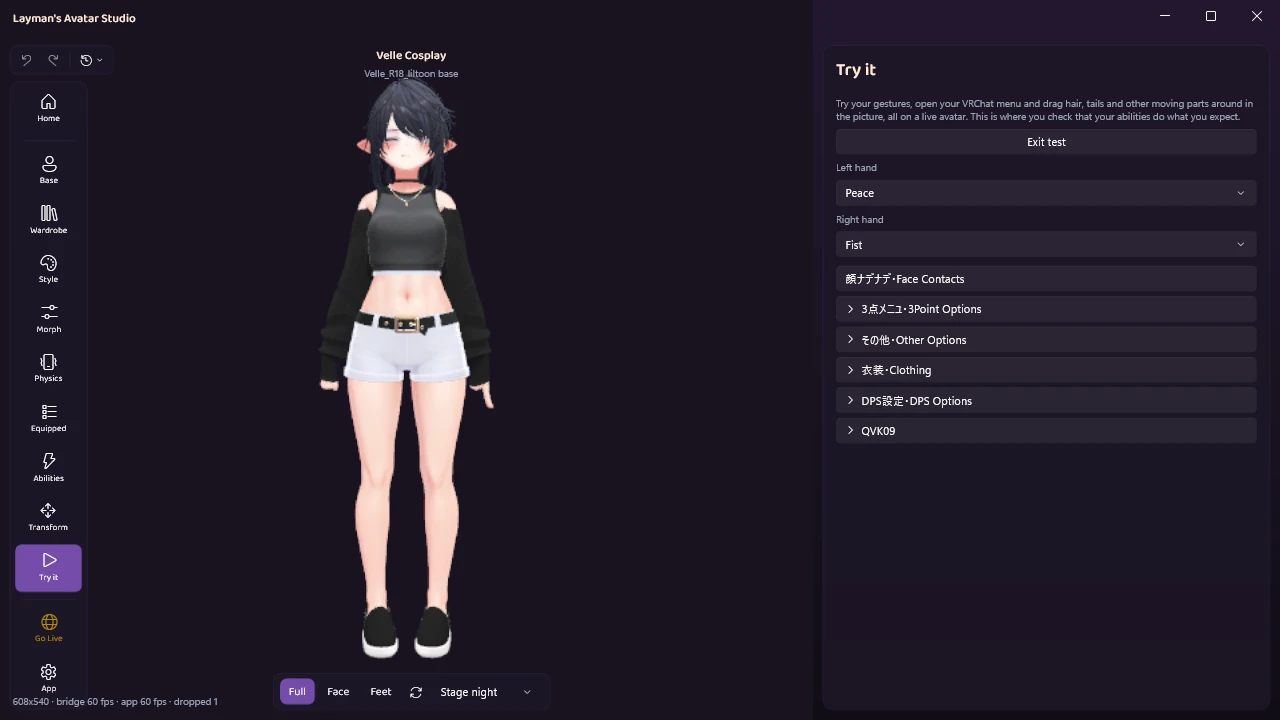
The fastest way to trust a trim is to test before and after you upload. Try it runs the avatar live with its gestures and menu, so you can flip each clothing toggle and drag the hair to feel the physics. In VRChat, check three things after a trimmed upload: your clothing toggles, how merged physics feels when grabbed, and any socket the report says was left out.
Questions people actually ask
Does a smaller file mean a better rank? No. Download size is a separate limit, and the rank is decided by your worst stat. A small avatar with 17 lights is Very Poor, and a large avatar with modest stats can be Medium.
Will deleting an outfit I never wear help? Yes, often more than anything else. Hidden pieces count toward material slots, meshes, physics and contacts exactly like visible ones.
Why did my rank drop after a VRChat update when I changed nothing? Most likely the August 2025 change that started counting textures used by material swaps. The avatar did not get heavier, the measurement got more accurate. Smaller textures are the fix.
My avatar is Poor. Is that good enough? For most rooms, yes. Poor still shows for players who set their limit to Poor, and Very Poor is the rank that gets hidden first.
Can I get to Good? Maybe. It depends on which stat is holding you at Poor, and it usually means wearing less at once rather than more optimization. Check your list and see how far over the Good line each stat is.
Did my recolor or edits cause the drop? Unlikely. Changing colors with a live color wheel does not add stats, but swapping in a larger texture or adding an outfit can. Compare the numbers before and after the change.
Does optimizing break my clothing toggles? It should not: merged pieces have their toggles rewritten to keep working. Try it is how you confirm before anyone else sees the result.
Get your rank down tonight
LAS is out in Early Access with a free plan. Download it for free, open your avatar, and the upload step tells you your rank and the stats holding it before you commit to anything. See the plans for what each one includes.
If a stat will not move, bring the numbers to the Discord and we will look at it with you.